Heartbeat monitors
Get alerted when a cron job or scheduled task stops checking in.
Overview
A heartbeat monitor is passive. Checkmate doesn't check anything: your job requests a ping URL each time it runs. If no ping arrives within the monitor's alert window, the monitor goes down and its notifications fire. Use it for cron jobs, backups and other scheduled tasks.
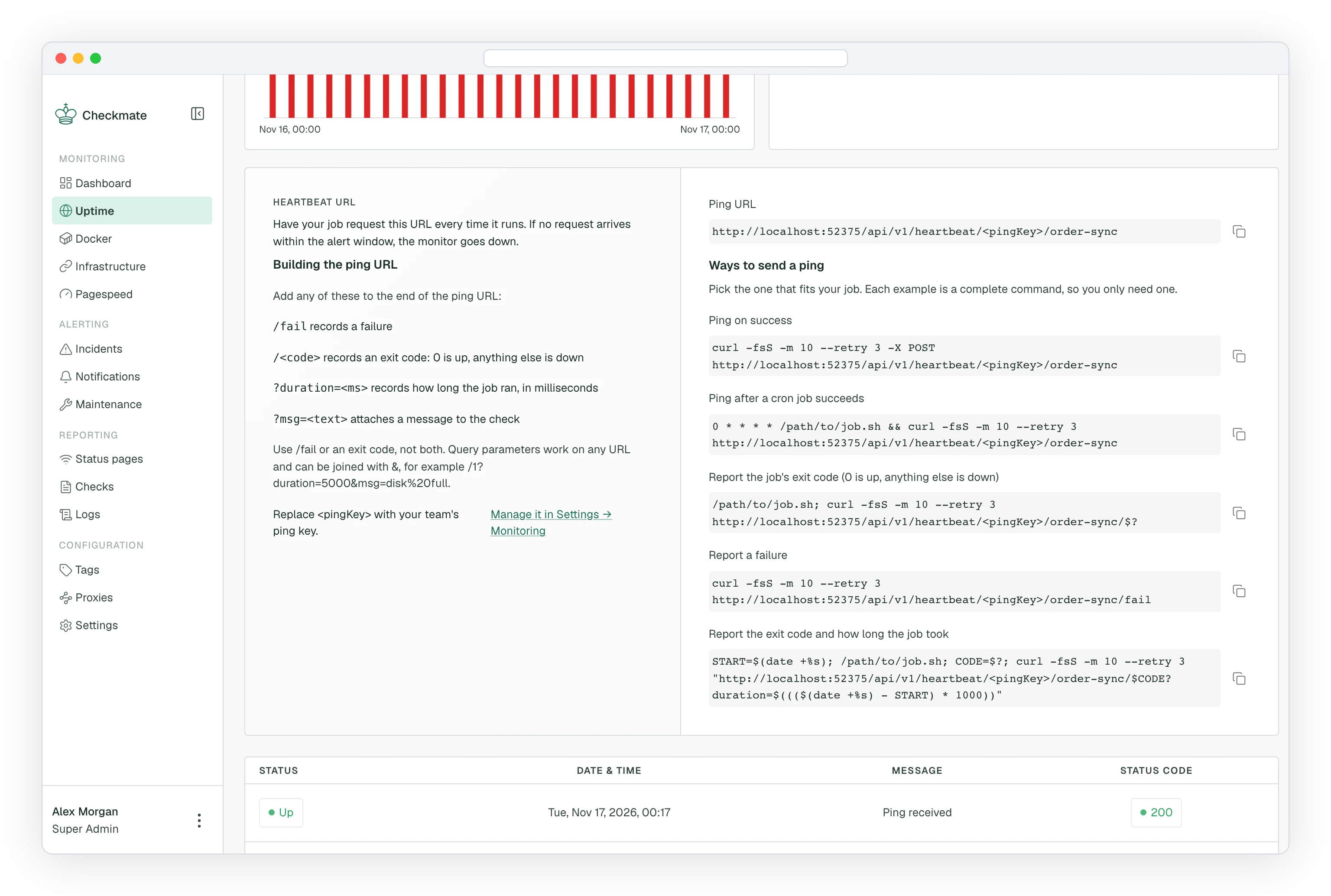
A ping can also report a failure or an exit code, so a job that runs but fails marks the monitor down without waiting for the window to pass.
Heartbeat monitors are available from Checkmate v4.0.0.
Generating the ping key
Each team has one ping key, used in every ping URL.
- Navigate to Settings and open the Monitoring tab
- Under Heartbeat ping key, click Generate key
- Copy the key. It is shown only once.
Only Admins and Superadmins can generate the key. Rotate key replaces it with a new one. The old key stops working immediately, so every job that pings a heartbeat monitor in the team must be updated.
Creating a heartbeat monitor
- Navigate to Uptime in the sidebar
- Click Create monitor
- Select Heartbeat as the monitor type
- Configure the settings below
- Click Create monitor
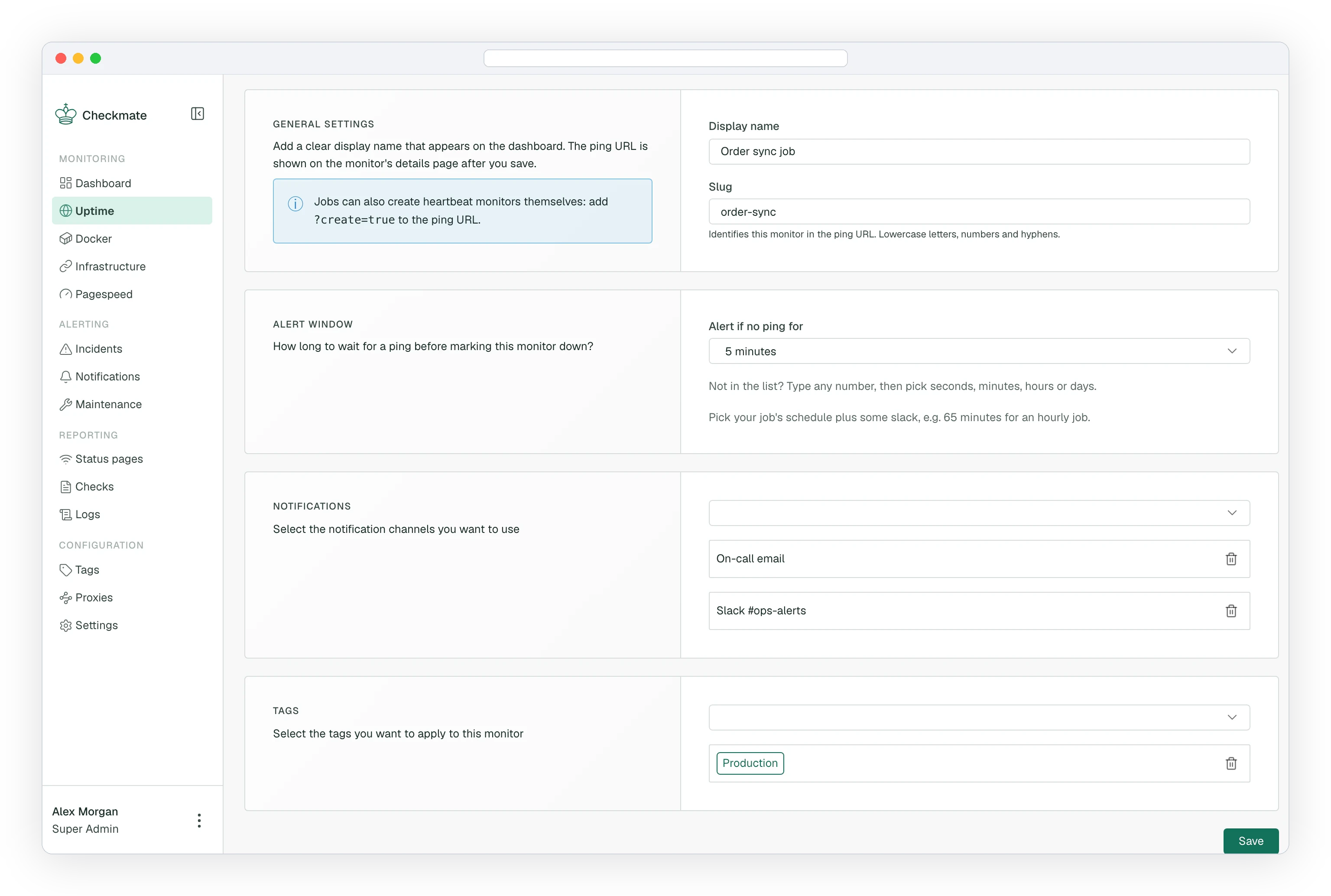
- Name: the display name shown on the dashboard
- Slug: identifies the monitor in the ping URL, for example
nightly-backup. Lowercase letters, numbers and single hyphens, up to 64 characters. Changing it later changes the ping URL, and jobs using the old URL stop working. - Alert if no ping for: the alert window, from 10 seconds to 31 days. Pick your job's schedule plus some slack, for example 65 minutes for an hourly job.
After you save, the monitor's details page shows its ping URL and ready-made examples.
The ping URL
https://<checkmate-host>/api/v1/heartbeat/<pingKey>/<slug>Replace <pingKey> with your team's key and <slug> with the monitor's slug. GET and POST both work.
| URL | Records |
|---|---|
/<pingKey>/<slug> | An up check |
/<pingKey>/<slug>/fail | A down check |
/<pingKey>/<slug>/<exitCode> | Up for 0, down for any other code (up to 255) |
Use /fail or an exit code, not both.
Optional query parameters work on any of these URLs and can be joined with &:
| Parameter | Effect |
|---|---|
duration=<ms> | How long the job ran, in milliseconds (up to 7 days). Shown as the check's response time. |
msg=<text> | A message stored on the check, up to 500 characters. URL-encode spaces as %20. |
create=true | Creates the monitor if the slug doesn't exist yet. See below. |
interval=<ms> | Alert window for a monitor created by create=true. Defaults to 1 day. |
Examples
Ping after a cron job succeeds:
0 3 * * * /path/to/backup.sh && curl -fsS -m 10 --retry 3 "https://<checkmate-host>/api/v1/heartbeat/<pingKey>/nightly-backup"Report the exit code and how long the job took:
START=$(date +%s); /path/to/job.sh; CODE=$?
curl -fsS -m 10 --retry 3 "https://<checkmate-host>/api/v1/heartbeat/<pingKey>/nightly-backup/$CODE?duration=$((($(date +%s) - START) * 1000))"
Report a failure with a message:
curl -fsS "https://<checkmate-host>/api/v1/heartbeat/<pingKey>/nightly-backup/fail?msg=disk%20full"Creating monitors from a job
Add create=true to the ping URL and a ping to an unknown slug creates the heartbeat monitor, then records the ping. Later pings reuse the same monitor.
curl -fsS "https://<checkmate-host>/api/v1/heartbeat/<pingKey>/nightly-backup?create=true&interval=3600000"- The new monitor is named after the slug and owned by the Admin who generated the ping key.
- It has no notifications until you add them in the UI.
- Requests with
create=trueare limited to 20 per hour per ping key, including pings to monitors that already exist. Remove the flag after the first run for jobs that ping more often than every 3 minutes.
Without create=true, a ping to an unknown slug returns 404, so a typo never creates a monitor.
Limits
- Pings are limited to 60 per minute for each ping key and slug. Extra requests get
429. - The ping key is part of the URL. Treat it like a password and rotate it if it leaks.